

Web view mini-app
Routing & query
How the Shoppingate app opens your web app on a specific page, passes data to it, and how your web app reads that data.
The scenario
The Shoppingate app shows a list of orders. The user taps one. Instead of opening your web app on its home page, you want it to open directly on the order details page, already showing that order.
Your Mini App has one shell page that holds the <web-view>. The Shoppingate app opens that page with a query:
path— the page of your web app to open. It can be any path, for examplea/b/c.- Any other values — the data that page needs.
You set this in the Merchant portal — see Deep-link config.
Step 1 — what your shell page receives
The query arrives as an object, in the page's onLoad and in App.onShow:
{
  "path": "pages/order_details/",
  "orderId": "123"
}
Step 2 — build the URL
Join path to your base URL, and add the other values as the query. You don't need to know what the values are — pass them all on.
// pages/index/index.js — your shell page

/**
 * Join the query to your base URL:
 *   base URL  https://your-site.com/
 *   query     { path: "pages/order_details/", orderId: "123" }
 *   result    https://your-site.com/pages/order_details/?orderId=123
 * With no path, your base URL opens.
 */
function deepLinkUrl(baseUrl, query) {
  const rest = Object.assign({}, query);
  const path = String(rest.path || "").replace(/^\/+/, "");   // no leading "/"
  delete rest.path;

  const url = path ? baseUrl.replace(/\/+$/, "") + "/" + path : baseUrl;
  return withQuery(url, rest);
}

/** Add the other values as ?key=value&... — encoded, so spaces and "&" are safe. */
function withQuery(url, query) {
  const pairs = Object.keys(query || {})
    .filter((k) => query[k] !== undefined && query[k] !== null && query[k] !== "")
    .map((k) => encodeURIComponent(k) + "=" + encodeURIComponent(String(query[k])));
  if (!pairs.length) return url;
  return url + (url.indexOf("?") === -1 ? "?" : "&") + pairs.join("&");
}

/** A string for one query, so two queries can be compared. */
function serialiseQuery(query) {
  return Object.keys(query || {}).sort()
    .map((k) => k + "=" + query[k]).join("&");
}
Step 3 — set it as the web-view src
<!-- pages/index/index.fxml -->
<web-view src="{{src}}"></web-view>
// pages/index/index.js
Page({
data: { src: "" },
// Runs when the page opens, with the query.
onLoad(query) {
const app = getApp();
app.lastDeepLink = serialiseQuery(query);
this.setData({ src: deepLinkUrl(app.globalData.baseUrl, query) });
},
// app.js onShow passes the query here.
onNewDeepLink(query) {
const app = getApp();
const serialised = serialiseQuery(query);
if (!serialised || serialised === app.lastDeepLink) return; // nothing new
app.lastDeepLink = serialised;
this.setData({ src: deepLinkUrl(app.globalData.baseUrl, query) });
},
});// app.js
App({
globalData: { baseUrl: "https://your-site.com/" },
// The last query opened, so the same one is not opened twice.
lastDeepLink: "",
// Runs every time the Mini App is shown, with the query.
onShow(options) {
const pages = getCurrentPages();
const page = pages[pages.length - 1];
if (page && typeof page.onNewDeepLink === "function") {
page.onNewDeepLink(options && options.query);
}
},
});Handle both.
onLoad and App.onShow can both run each time the Mini App opens, and both receive the query. Compare it with the last one, so the same page is not opened twice.Step 4 — read the values in your web app
Your web page opens at https://your-site.com/pages/order_details/?orderId=123, and reads the values from its own URL:
<!-- https://your-site.com/pages/order_details/?orderId=123 -->
<script>
  var params = new URLSearchParams(location.search);
  var orderId = params.get("orderId");   // "123"
  loadOrder(orderId);
</script>
Testing
In SG Studio, open the compilation list next to Compile (it shows Ordinary Compilation) and click Add Compilation Mode.
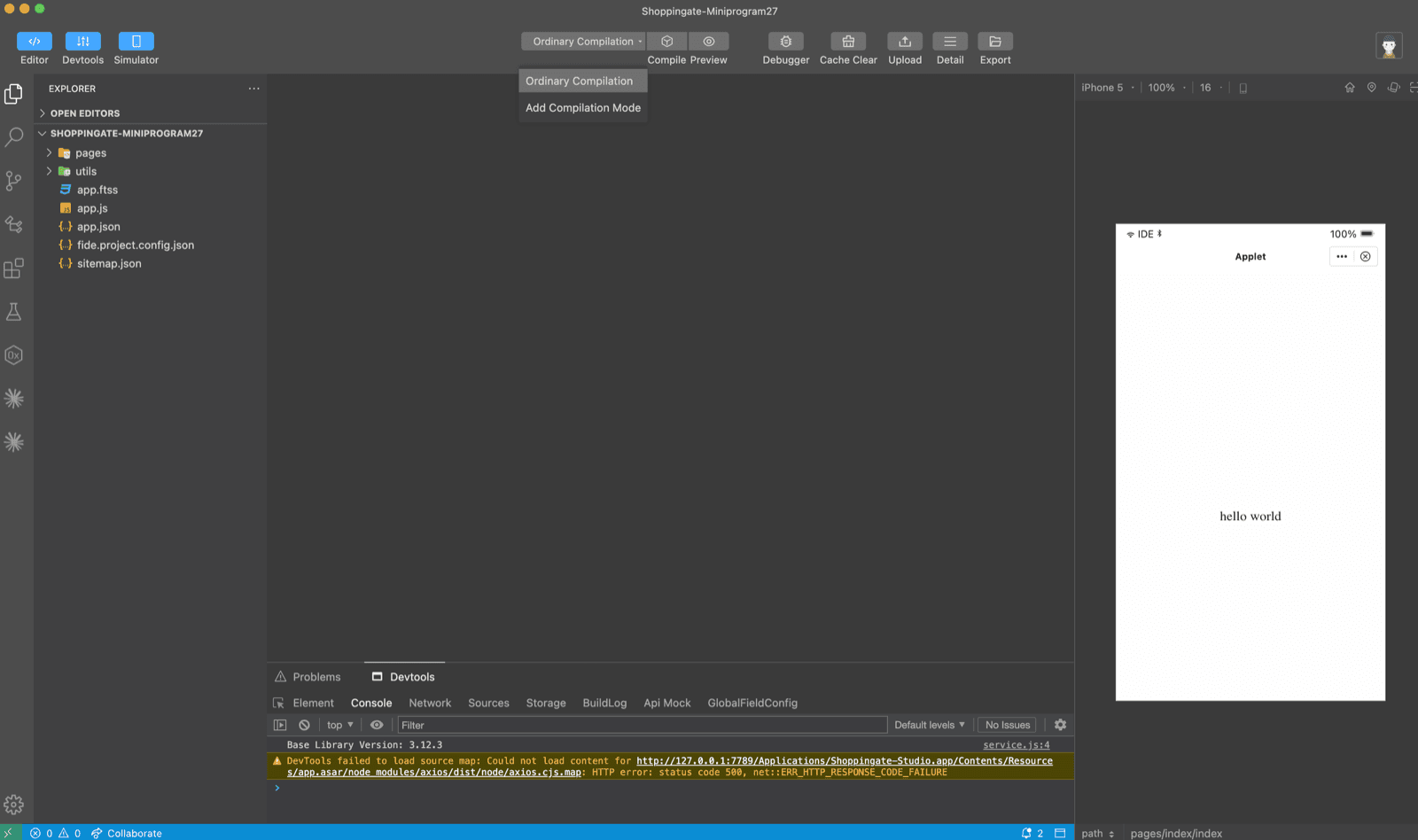
Set page and params to what the Shoppingate app would send, click Confirm, then click Compile:
- page —
pages/index/index - params —
path=pages/order_details/&orderId=123
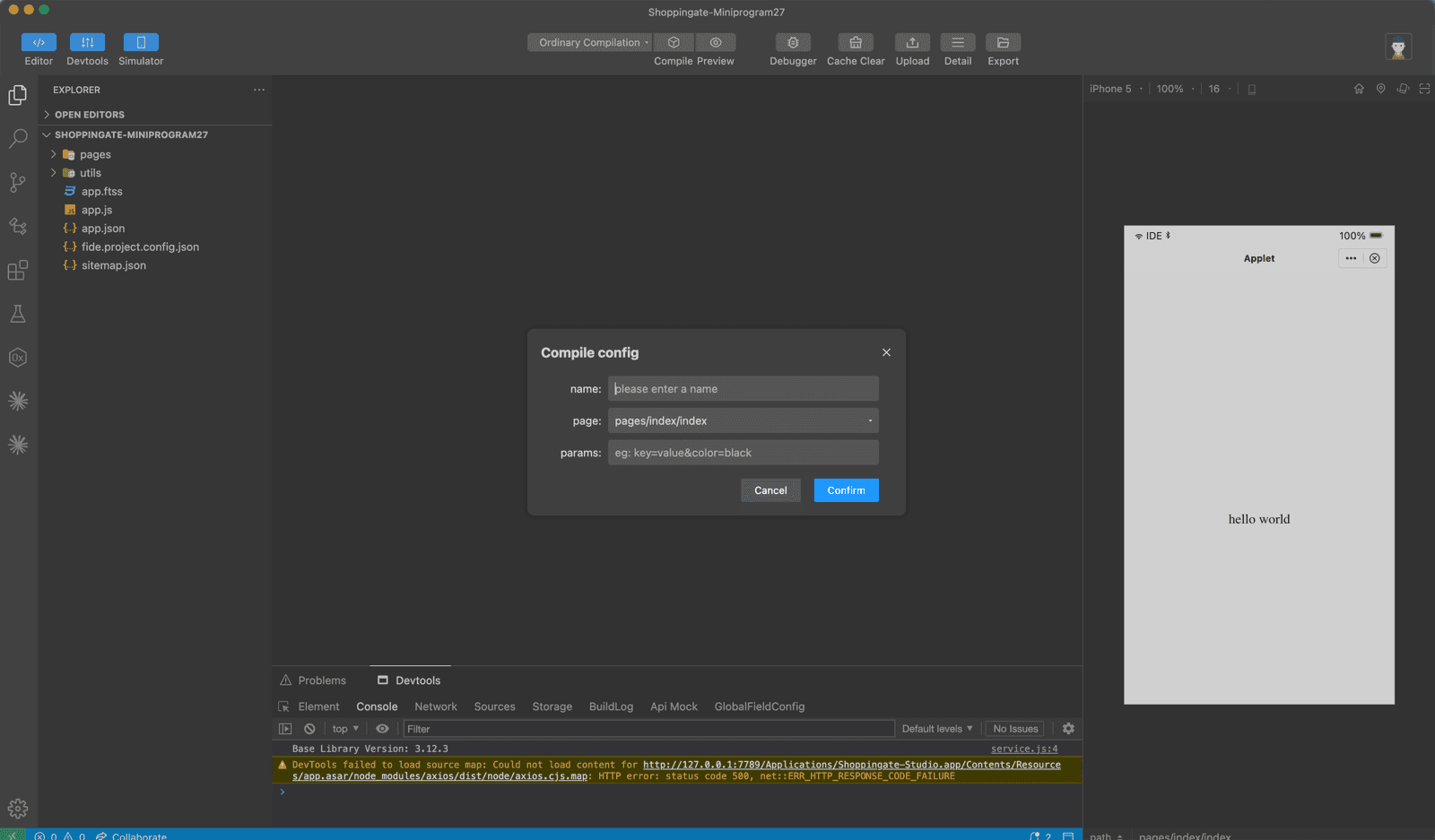
Your web app opens at https://your-site.com/pages/order_details/?orderId=123. More on compilation modes in The workspace.
Checklist
- The page exists in your web app at
path - Your base URL is the site address only, without a file name like
index.html - Your shell handles the query in both
onLoadandApp.onShow - Your web page handles a missing value instead of rendering blank